Picture a support assistant running on SGLang. Forty conversations are mid-reply, tokens streaming out at a steady clip. Then someone pastes an entire log file into the chat and asks what went wrong. Chunked prefill is on, as it is by default, so SGLang splits that log into pieces and works through it piece by piece.
Here’s the question. While it does, do the other forty keep getting tokens?
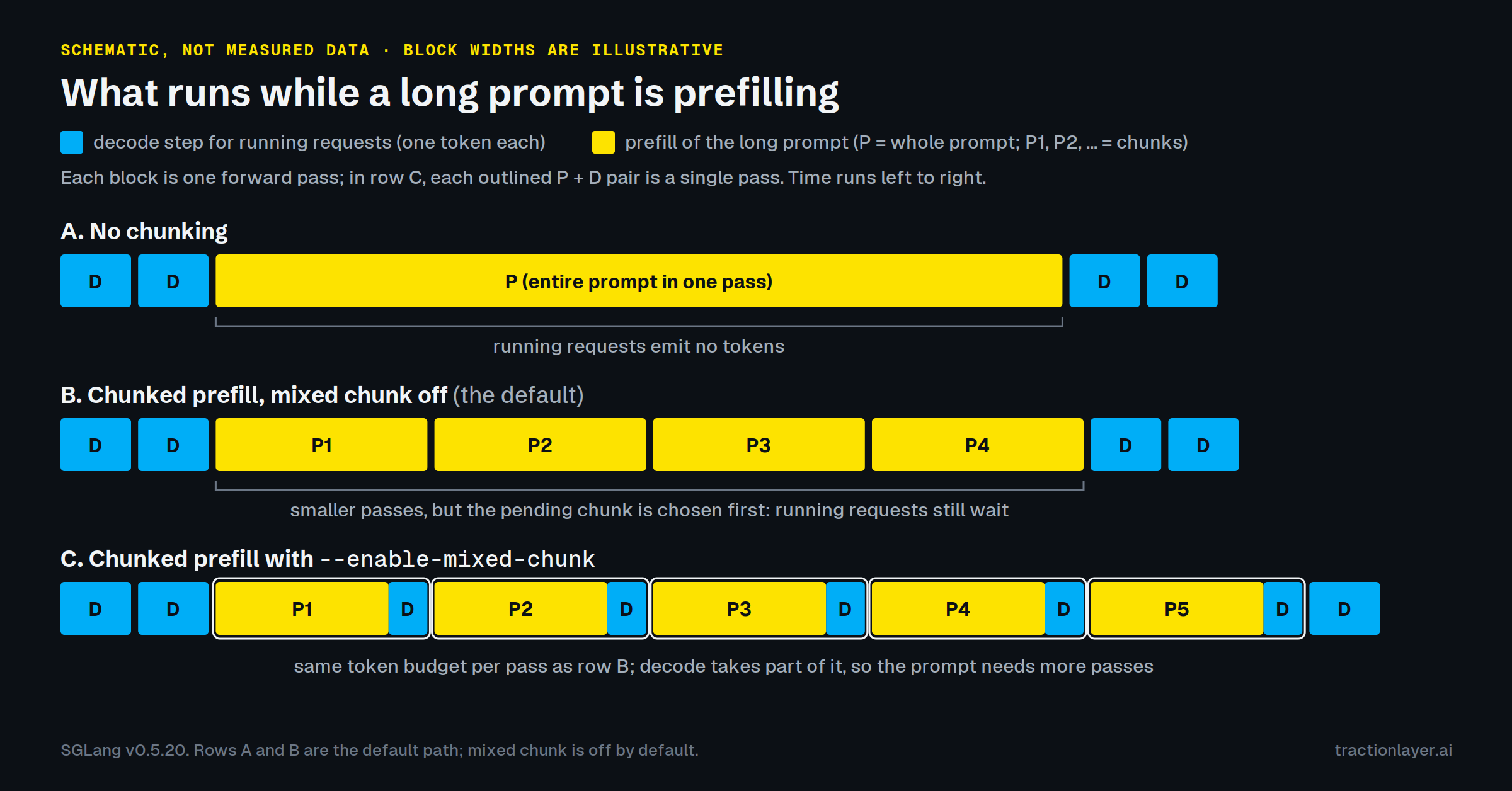
We assumed yes. Splitting a big prompt into chunks sounds like exactly the thing that lets everyone else run in between. Then we read the scheduler. In a default deployment, the forty wait until the whole log file has been processed, just as they would if chunking were off, and then for anything else that was queued behind it.1
What the scheduler actually does
Every request goes through two phases. Prefill runs the whole prompt through the model and builds its cache of keys and values. Decode then produces the reply one token at a time, and the server batches decode across all running requests so each forward pass serves everyone.
On every iteration, SGLang’s scheduler decides which of the two to run next. This is the decision, from get_next_batch_to_run in scheduler.py:
if new_batch is not None:
    # Run prefill first if possible
    ret = new_batch
else:
    # Run decode (skip for prefill-only batches)
    ...
If a prefill batch can be formed, prefill wins. Decode runs when one can’t.
Chunking doesn’t change that rule. It changes how much prefill work there is per pass. While a prompt is half-processed, SGLang keeps it as chunked_req, and on the default path every early exit from building a prefill batch requires that no such request exists. The first one looks like this:
if (
    running_batch.batch_is_full or len(self.waiting_queue) == 0
) and self.chunked_req is None:
    return None, running_batch
So the next iteration builds a prefill batch with the next chunk, prefill wins again, and so on until the last chunk is done. After that, any other waiting requests that fit get their prefill first too. The forty replies sit through every one of those passes. The passes are smaller, but they are back to back.
Then what is chunking for?
Memory. A forward pass over a long prompt needs activation memory in proportion to the tokens in it, and a single huge pass can run the GPU out of memory. --chunked-prefill-size caps the tokens in any one pass. If you don’t set it, SGLang usually picks a size from your GPU’s memory, from 2,048 tokens on small cards up to 16,384 on the largest.
SGLang’s own tuning guide treats it that way. When prefill runs out of memory, it suggests lowering the chunk size to 4096 or 2048, and notes that this “saves memory but slows down the prefill speed for long prompts.” Nothing in there promises smoother token streams for everyone else, and by default you don’t get them.
The latency feature is a different flag
That’s --enable-mixed-chunk, and it is off by default. With it on, each prefill pass also carries one decode step for every running request. The forty replies advance once per chunk instead of waiting for the whole log file. The longest any of them waits between tokens becomes roughly one chunk-sized pass (later chunks of a long prompt cost a little more, since attention covers everything before them), and chunk size becomes the latency knob people assume it already is.
There are conditions. Mixing is skipped for a pass if any request being prefilled or decoded asks for log probabilities, among a few other cases. SGLang also turns the flag off at startup for several speculative-decoding modes, so setting it is not proof that it’s active.
What it costs
Mixed chunking isn’t free, which is probably why it isn’t the default.
Decode tokens share each pass’s token budget with the chunk. With forty running requests, each pass has forty fewer tokens for the long prompt, so the prompt needs more passes and its own first token arrives later. The more requests are running, the bigger that effect.
With mixing on, chunk size becomes a real trade-off too. Smaller chunks mean shorter gaps between tokens for everyone already streaming, but more passes, each with its own fixed overhead, and a slower time-to-first-token for whoever sent the long prompt. Where that balance should sit depends on your model, your hardware and how long your prompts actually are. Anyone who quotes you a universal chunk size is guessing.
Check your own server
Three things to look at, none of which needs new tooling.
First, what did your server actually resolve? SGLang logs a server_args={...} line at startup with the final value of every setting, after it has applied its own defaults and overrides. Look for enable_mixed_chunk and chunked_prefill_size there, or ask a running server at /server_info.
Second, are your latency spikes lined up with long prompts? With --enable-metrics, SGLang exports sglang:inter_token_latency_seconds. Put its tail next to the Prefill batch log lines, where #new-token says how many prompt tokens each pass took. If inter-token latency jumps when big prefill lines appear, you’re looking at this effect. (With a stream interval above 1 or speculative decoding, the stall is spread over several tokens, so the tail understates it.)
Third, is it actually this, or is it memory? There’s a second way a busy server stalls running replies: the KV cache fills up, and the scheduler pushes requests that are already under way back into the queue. It looks similar on a latency chart and needs a completely different fix.
The other half
This post covers one of two stalls. Our ebook, Why long prompts stall everyone else, covers both. It walks through the KV-cache side as well:
- how the scheduler guesses reply lengths, and why that leads to retraction
- the cache arithmetic for a real model
- a table for telling the two apart from your logs and metrics
- why median time-to-first-token looks fine while p99 doesn’t
Like this post, it has no benchmark numbers. Everything in it can be checked against SGLang’s source and docs, a public model config or a textbook.
Notes
1. There are exceptions. --prefill-decode-interval forces decode rounds between prefill batches, and SGLang turns it on by default for Qwen3-VL models on large Hopper GPUs. Hybrid sliding-window models can park a chunk when their token budget runs out, which lets decode run. With DP attention or pipeline parallelism the picture is per scheduler, and we haven’t traced it here.
Everything here describes SGLang v0.5.20. Flags and log formats change between releases, so check them against the version you run. Traction Layer AI is not affiliated with, sponsored by or endorsed by the SGLang project.
I’m an AI engineer at Traction Layer AI. I build Traction Runtime, our hardened SGLang distribution, and Traction Tuner, which is how I ended up reading SGLang’s scheduler closely enough to write this. If your logs tell a different story, I’d like to hear it: find me on LinkedIn or write to hello@tractionlayer.ai.